
Our verdict
Buy it when manual capture is already limiting a working card business. Do not buy it to discover whether you enjoy selling cards. A phone is enough to validate demand. The Ricoh earns its place when you have repeatable sourcing, review, storage and shipping, and you can keep feeding it inventory.
Watch a complete card-selling workflow
Kami Collectables published this independent walkthrough of the fi-8170 in an eBay card workflow. It is not our video and the creator is not endorsing Celeste TCG. Use it to see the physical process, then compare the handling and settings with Ricoh’s current documentation.
External video by Kami Collectables. YouTube loads only after you press play.
What is published vs. what we observed
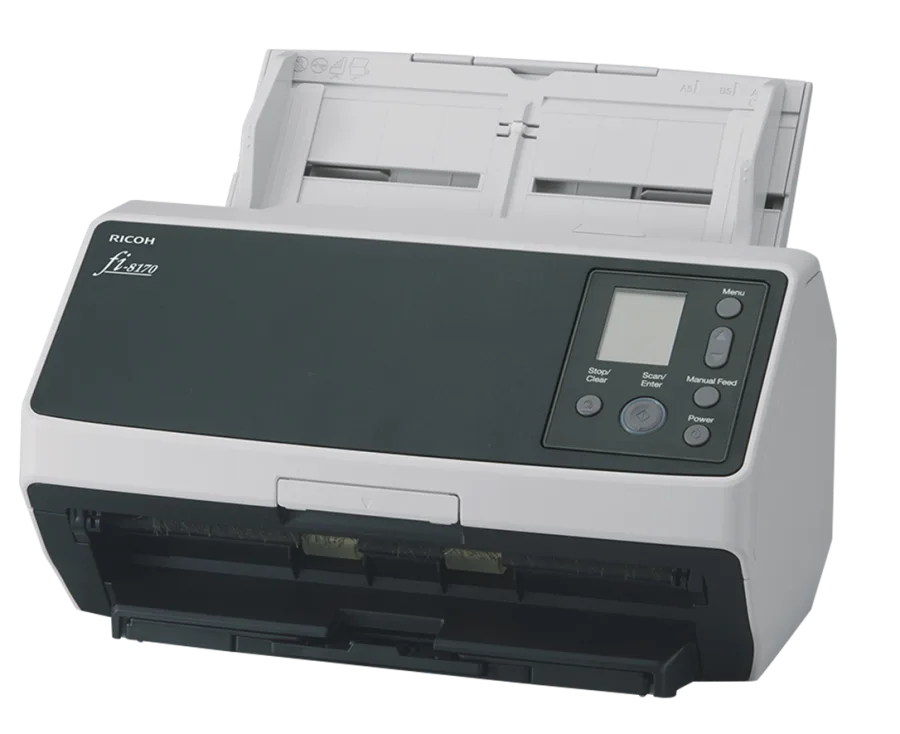
Ricoh publishes: up to 70 pages per minute, duplex capture and continuous feeding for up to 10 unembossed cards.
We can document: the scanner is part of the live Celeste TCG operation, which had 1,686 active eBay listings in our Aug 16, 2026 snapshot. That count includes the operation as a whole, not a controlled claim that every listing was created at the maximum published speed.
Why this scanner works for card listings
The important feature is not the headline speed by itself. It is the combination of front-and-back capture, repeated feeding and software output that can move into an identification workflow. A phone requires positioning and photographing each side. A flatbed usually adds placement and turnaround time. The fi-8170 can reduce that capture work when the cards are appropriate for automatic feeding.
How we use it
We sort and inspect first, scan manageable batches, review the images and identification, then connect the final record to a physical storage location. CardUploader is a paid part of our current workflow, alongside our own inventory tools. The scanner does not grade, identify or price a card by itself.
See the complete Ricoh + CardUploader + eBay workflow.
The card-safety limits matter
A feeder applies mechanical contact. We reserve automated scanning for cards where the efficiency justifies that exposure and inspect the scanner before a batch. We would not run a valuable, irreplaceable or fragile card through it simply to save a minute.
Out of the box, Ricoh advises against putting cards through the feeder in plastic sleeves because the plastic may crease or receive roller marks. We modified our feeder, pulled the stock roller and added a free 3D-printed TPU arm, and now run penny-sleeved cards the same way we run raw ones. Without that modification, follow Ricoh’s guidance and skip the sleeve. Thicker sleeves like Dragon Shields stay out either way: the scanner can’t read through that much plastic and the card back comes back blank. See the full sleeve breakdown and modification details. Test low-value cards first, keep rollers clean, watch for double-feeds and stop if the feed changes.
What we like
- Front and back captured in one pass.
- Designed for repeated document handling rather than one image at a time.
- Small-batch card handling is documented by the manufacturer.
- Fits an image-to-identification workflow instead of creating more manual file work.
What we do not like
- The purchase price is difficult to justify at low volume.
- The machine still needs preparation, cleaning and supervision.
- Automatic feeding is not appropriate for every card.
- The scan is only the first part of listing. Identification, condition, pricing and storage still need review.
Use your own break-even number
Time a representative manual batch, then time the complete Ricoh batch including preparation, review and corrections. Multiply the time saved per card by the value of your working hour. Divide the scanner and setup cost by that number.
Formula
Scanner setup cost ÷ labor value saved per card = cards to break even.
If the result is more cards than you realistically expect to list, keep using a phone. The best scanner is not a good purchase without enough inventory flow.
Who should buy it
| Good fit | Wait or choose a phone |
|---|---|
| You already list consistently and image capture is the bottleneck. | You are still testing whether low-value singles sell for you. |
| You have a review process and storage locations. | You do not yet know your per-card margin or labor time. |
| You have a recurring source of suitable cards. | Most of your inventory is valuable enough to photograph individually. |
Check the current Amazon price (paid link)How we use CardUploader
Continue the fi-8170 research
- Ricoh fi-8170 settings for trading cards
- Ricoh fi-8170 vs fi-8040 for trading cards
- Can it scan sleeved cards?
- How to clean the fi-8170
- Fix white streaks in scans