
The short answer
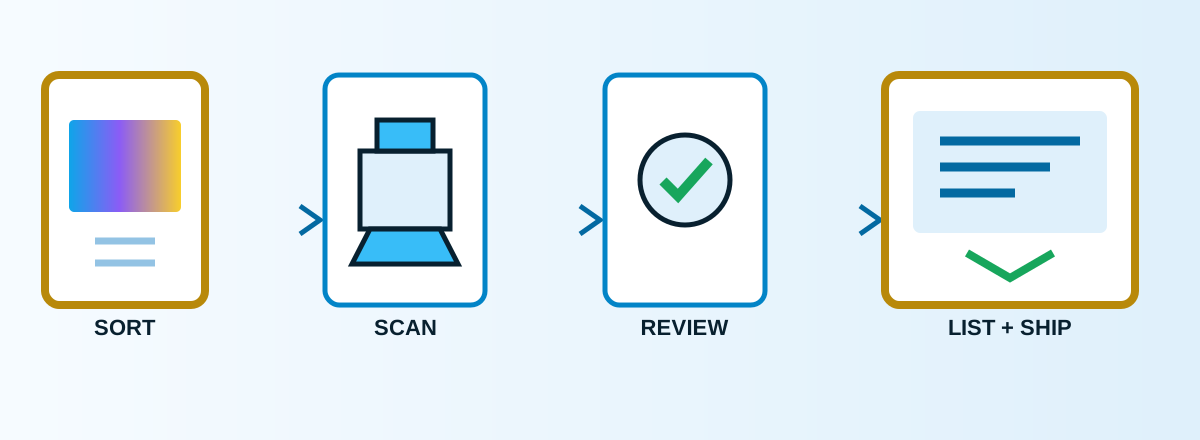
Do not treat every bulk card the same. Sell true commodity bulk as lots when the labor of an individual listing exceeds the likely margin. List searchable singles when the Pokémon, artwork, set, playability or condition gives a buyer a reason to choose that exact card. The scanner and software only make sense after manual listing becomes your bottleneck.
1. Decide what “bulk” means in your business
There are two different businesses hidden inside the phrase “selling bulk.” The first is selling a large mixed lot to another buyer. It is fast and simple, but the price per card is low. The second is taking cards from a bulk purchase and listing selected low-value singles one at a time. It can produce more revenue per card, but only when your labor, fees, supplies and shipping stay under control.
| Route | Best for | Main cost | Our rule |
|---|---|---|---|
| Sell as a lot | Repeated commons, energy and cards with no clear individual demand | Lower return per card | Choose speed when the listing labor is not justified |
| List as singles | Popular characters, playable cards, older sets, notable art and clean condition | Time, marketplace fees and fulfillment | Choose singles only when a buyer can search for that exact card |
2. Sort before you scan
Remove damaged, warped and dirty cards first. Separate obvious higher-value cards for individual inspection. Then create consistent batches by set or product when you can. A clean batch reduces identification errors and makes it easier to catch a wrong set, parallel or card number during review.
We do not rely on one universal price floor. Your threshold has to cover marketplace fees, packing material, postage, the time to review and list the card, and the time to find it again after it sells. Before listing, write down that minimum contribution for your own operation.
3. Scan both sides with the Ricoh fi-8170
The fi-8170 is useful because it captures the front and back in one pass and is designed for repeated feeding. Ricoh publishes speeds up to 70 pages per minute and documents continuous feeding of up to 10 unembossed cards. Those are manufacturer specifications, not a promise that every trading-card batch will run at that speed.
Start with a small test batch. Keep the cards aligned, inspect the feeder and rollers, and stop if you see marks, unusual resistance or double-feeds. We do not recommend feeding valuable cards automatically. Ricoh also cautions against scanning cards in plastic sleeves through the feeder because sleeves can crease or pick up roller marks. Sleeve the card after scanning, not as protection during the scan.
Read our full Ricoh fi-8170 review for the purchase decision, limits and break-even calculation.
4. Use CardUploader for identification, then review the result
We are paid CardUploader users. It is part of our workflow alongside our own inventory tools. Its role is to help turn images into identified card data and listing information faster than typing every field from scratch.
Automation does not remove the review step. Confirm the card name, set, card number, parallel or finish, language and condition. Look at the back image before choosing a condition. A confident-looking wrong match can create a return, a defect or a disappointed buyer, so the human confirmation is part of the workflow.
Try CardUploader (referral link)How we use CardUploader
5. Build an eBay listing that answers the buyer
Use a consistent title with the Pokémon or card name, set, card number, finish or rarity when relevant, and condition. Fill the item specifics instead of hiding important facts in the description. Use the actual front and back scans for the exact card whenever condition matters.
Price from current sold evidence, not only active listings. Then check the full order economics. eBay fees, promoted listing costs if you use them, postage, envelope, sleeve, rigid protection and handling time all come out of the sale. eBay’s own trading-card guidance is linked in the sources below because shipping eligibility and marketplace rules can change.
6. Give every listed card a physical address
A listing is not complete until the card can be found quickly. We assign a storage location that maps the digital record to a box, row or slot. The exact naming convention matters less than using it every time. Never create the listing and plan to organize the card later.
After scanning, use a penny sleeve before rigid protection. For shipping, choose the mail class and protection based on the order value and the marketplace requirements. A toploader is not a replacement for a sleeve: the sleeve protects the surface, while the rigid holder helps prevent bends. Secure the card so it cannot slide out during transit.
7. Buy the setup only when the math works
Start with a phone if you are still learning what sells. A Ricoh becomes rational when scanning is the constraint and you already have enough supply, listing discipline and storage capacity to keep it working. Use this simple calculation:
Break-even formula
Setup cost ÷ value of time saved per card = cards needed to break even.
Use your actual purchase price, your observed manual time and a realistic value for your labor. Do not use someone else’s sales screenshots as your forecast.
As of Aug 16, 2026, Celeste TCG documented 1,686 live eBay listings. That is evidence that the operation is live, not a guarantee that the same system will be profitable for every seller.
Check the Ricoh fi-8170 price (paid link)See our live eBay store
What to improve first
Selection
Learn which cards deserve individual listings.
Repeatability
Standardize titles, review and storage locations.
Speed
Add the scanner and software after the process works.